Understand and Reduce Nutrient Gaps with Real Food Choices
Tip-Top Food™ helps you understand and reduce nutrient gaps using a simple two-step process built on standardized USDA nutrient data and FDA Daily Values.
Choose a nutrient — like protein — or a nutrient group such as vitamins or minerals — then add a food that increases intake relative to Daily Values or your selected targets.
Nutrient gaps can exist even within balanced eating patterns. Identifying and addressing them systematically allows food choices to become more intentional and data-driven.
With Tip-Top Food™, you can:
Identify nutrient gaps across 97 USDA-measured nutrients
Compare foods by nutrient density and Daily Values
Personalize portions and reinforce your Favorites Pantry
Rather than restricting foods, the app lets you compare options, personalize portions in real time, and reinforce the nutrient-rich foods you already enjoy. By focusing on addition instead of elimination, you can make informed, data-driven decisions using real food.
Prefer to explore independently? Tip-Top Food™ also offers intuitive search and direct access to standardized nutrient data from six USDA databases, so you can quickly review and compare detailed summaries for any food — even without following the two-step process.
Tip-Top Food™ guides you through two focused steps to reduce nutrient gaps and increase nutrient intake.
Search by nutrient or food category, apply filters such as dairy-free or whole foods only, and explore foods ranked by nutrient density — without removing your existing favorites.
The process becomes clear when separated into two practical steps.
Step 1: Target Nutrients for Nutrient Gap Reduction
Focusing on specific nutrients helps identify nutrient gaps and actionable food choices.
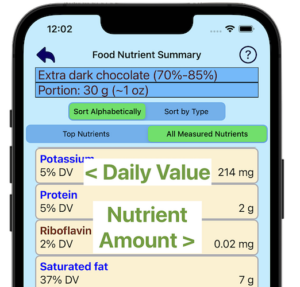
Nutrient Summary View (Single Food) View a food’s nutrient summary to compare FDA Daily Values with measurements from the United States Department of Agriculture. If a nutrient falls below your target, select it and explore foods with higher values to help close the gap.
FOODS ACCESSED BY INDIVIDUAL NUTRIENTS
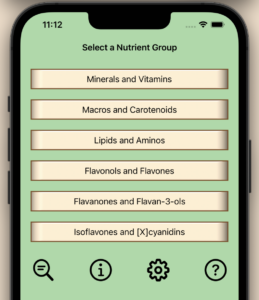
Nutrient Group Selector Use the nutrient group selector to evaluate categories such as minerals or vitamins. This systematic approach helps identify nutrient gaps without relying on assumptions about a food’s overall profile.
NUTRIENT GROUPS SELECTOR
Once a nutrient gap is identified, the next step is selecting foods that help improve it.
Step 2: Add Nutrient-Dense Foods to Reduce Nutrient Gaps
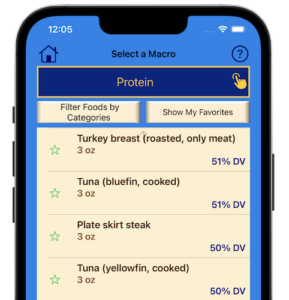
After selecting a nutrient in step 1, nutrient results are prioritized by nutrient density using data from the United States Department of Agriculture and Daily Values from the United States Food and Drug Administration.
Mark favorites to create a quick-access list and move preferred foods to the top for highest visibility while exploring nutrient-dense options that help close nutrient gaps. Favorites may include either new selections or your original food if it met your target.
FOODS RANKED BY NUTRIENT DENSITY
The process remains direct: target nutrients, then reinforce either an existing food or a new food in your Favorites Pantry. Add foods that increase intake.
After identifying promising foods, you can fine-tune results using personalization tools.
Ready to explore nutrient gaps in your own foods?
Optional Tools to Personalize Nutrient Gap Reduction
Initial serving sizes are based on the United States Food and Drug Administration Reference Amounts Customarily Consumed (RACC), the same standards used on food labels and applied to whole foods.
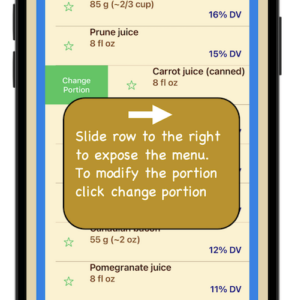
Adjust serving sizes within the food summary or nutrient list. Nutrient values update in real time, allowing you to evaluate how portion changes affect Daily Value percentages and measured amounts.
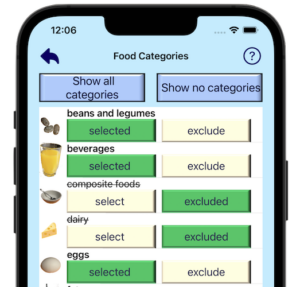
Category filters — such as dairy-free or whole foods only — help refine results and align food choices with your preferences while addressing nutrient gaps.
PORTION CHANGES UPDATE NUTRIENT VALUES
SELECT CATEGORY PREFERENCES
Once you’ve identified foods that improve your nutrient intake, the next step is consistency.
Maintenance: Reinforce the Foods You Already Love
Reducing nutrient gaps works best when nutrient-rich foods remain easy to access. The Favorites Pantry stores foods you mark and places them at the top when you focus on a specific nutrient.
This keeps preferred options visible and supports consistent use of foods aligned with your goals.
Verified Data: The Precision Behind Your Nutrient Gaps
Behind every nutrient data measurement is a standardized data foundation. Accurate nutrient analysis begins with verified data.
Tip-Top Food™ integrates six specialized USDA databases:
USDA Standard Reference (SR28)
USDA Iodine Content
Food and Nutrient Database for Dietary Studies (FNDDS)
USDA Flavonoid Content
USDA Proanthocyanidin Content
USDA Isoflavone Content
By relying exclusively on USDA nutrient data, the app provides standardized measurements across:
Macronutrients
Micronutrients
Phytonutrients
This data-driven foundation supports confident nutrient evaluation while reinforcing foods saved in your Favorites Pantry.
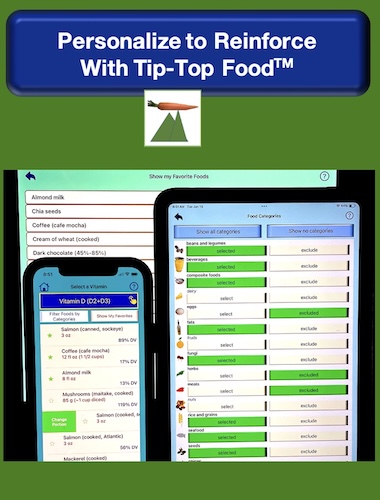
PERSONALIZED CATEGORIES. PORTIONS, AND PANTRY
Want to know more about the USDA databases and their data?
Explore personalized nutrition insights with Tip-Top Food™.
Nutrition Gaps Frequently Asked Questions
Tip-Top Food™ is an educational nutrition reference tool, not medical advice or individualized dietary recommendations. It supports personalized food exploration using standardized nutrient data.
Below are answers to common questions about how Tip-Top Food™ works and how nutrient gaps are evaluated.
Tip-Top Food™ uses color-coded nutrient summaries to compare foods using data from the United States Department of Agriculture against Daily Values from the United States Food and Drug Administration. It highlights nutrients that may fall below your targets based on portion size and food selections.
Explore the variety of nutrients by clicking “Explore Variety”.
Apply category filters, enable or disable groups like dairy, and save favorites to prioritize nutrient-dense options. The Favorites Pantry and search tools help you focus on foods you enjoy while reviewing nutrient data.
Calories measure energy, not nutrient content. Nutrient gaps also relate to vitamins, minerals, and other dietary components that support normal nutritional adequacy. Looking beyond calories helps you make more informed food choices based on nutrient quality.
Yes. Tip-Top Food™ uses verified data from the United States Department of Agriculture and Daily Values from the United States Food and Drug Administration.
For more information, click “Explore USDA Databases Info.”
Yes. Adjust serving sizes, apply filters, and prioritize favorites. Nutrient values update in real time so you can evaluate how portion changes influence Daily Value percentages and measured amounts.
Yes. Use filters to exclude composite foods and focus on single-ingredient options. Results remain sorted by nutrient density for clear comparison based on nutrient content and personal preferences.